
Brand Manifesto
- Format
- Static
- Category
- Founder & Brand Story
- Stage
- TOF
- Requires
- Prompt only
What is it
An ad that leads with a stance instead of a benefit. You name the thing your customer already hates — the price, the complexity, the shame, the wasted time — and position the product as the escape from it. It sells belonging before it sells features.
What makes it work
Name a specific enemy
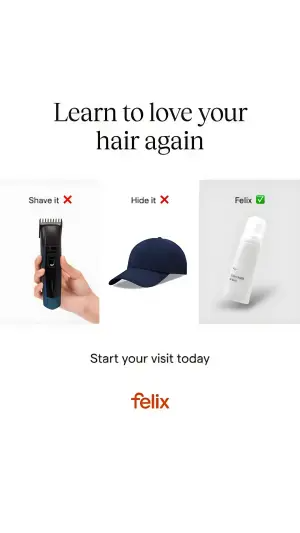
Not "bad skincare" but overpriced perfume, the four-step routine, hiding under a cap. Vague enemies don't convert. The more precisely you name the frustration, the more people feel seen by it.
Make the enemy visual
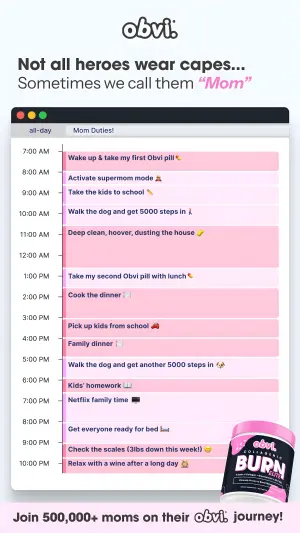
Crossed-out red text, a red X, a calendar packed edge to edge, three losing options. The stance has to be readable before anyone reads a word, which means the problem needs a shape, not just a sentence.
Make the product the visual opposite
If the enemy is chaos, the product sits clean and calm. If the enemy is complicated, the product is one object on an empty background. The contrast between the two halves is the ad.
Land a payoff line
One sentence naming the new reality. "We make it simple." "Smell iconic." "Learn to love your hair again." Without it the ad is a complaint with a product next to it.
Order it: enemy, product, payoff
Boldest element first, hero second, seal third. The eye should travel problem → solution → new life.
The positive version is the same move inverted
Instead of an enemy, champion an identity — busy mothers, people who refuse to settle. You're still taking a side; you've just picked who you're for rather than what you're against.
Reference 1
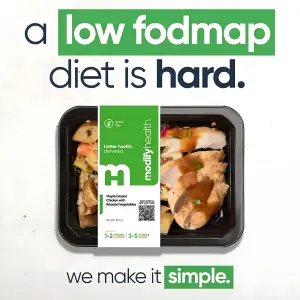
AI Edit Master Prompt
Using the attached image as the layout reference: keep the top headline with one phrase in a solid colour block and the rest in black, the top-down packaged meal centred on a flat background, and the closing line at the bottom with its final word in the same colour block. Replace the meal with {YOUR PRODUCT} shot top-down, and the accent colour with {YOUR BRAND COLOR}. Set the headline to "{THE ENEMY}" and the bottom line to "{THE PAYOFF}".Reference 2
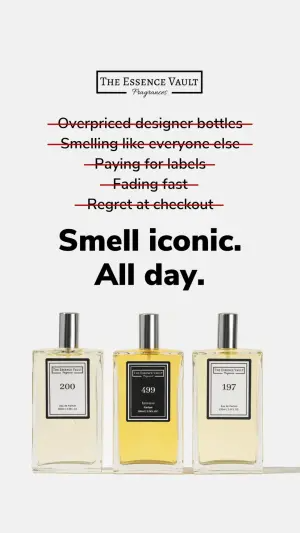
AI Edit Master Prompt
Using the attached image as the layout reference: keep the off-white background, the boxed wordmark at the top, a stack of five centred lines each struck through with a red line, a large bold two-line headline beneath them, and three identical bottles standing side by side at the bottom. Replace the bottles with {YOUR PRODUCT} in the same minimal styling. Set the wordmark to "{YOUR BRAND}", the struck-through lines to "{WHAT THEY HATE}", and the headline to "{THE PAYOFF}".Reference 3
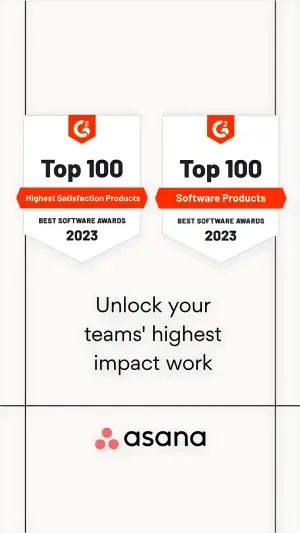
AI Edit Master Prompt
Using the attached image as the layout reference: keep the off-white background with thin vertical framing lines at the edges, two identical shield-shaped award badges side by side in the upper half, a centred three-line headline in the lower half, and the wordmark at the bottom. Replace the badges with {YOUR AWARD} and the wordmark with {YOUR BRAND}. Set the badge text to "{AWARD TEXT}" and the headline to "{THE PAYOFF}".Reference 4
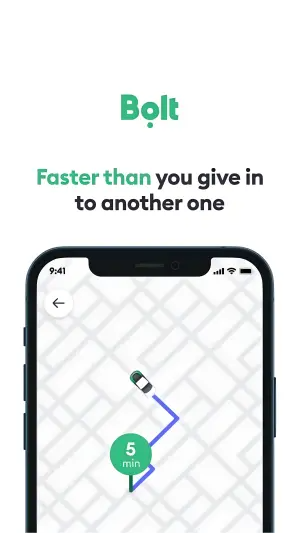
AI Edit Master Prompt
Using the attached image as the layout reference: keep the white background, the wordmark at the top, a two-tone headline beneath it with the opening phrase in the brand colour, and a phone mockup filling the lower half showing a simplified vector map with a car on a coloured route and a round destination pin. Replace the brand colour with {YOUR BRAND COLOR} and the map screen with {YOUR APP SCREEN}. Set the wordmark to "{YOUR BRAND}", the headline to "{THE ENEMY}", and the pin label to "{THE PROMISE}".Reference 5
AI Edit Master Prompt
Using the attached image as the layout reference: keep the white background, a large elegant serif headline across the top, and three panels in a row below it — each with a small label above the object, the first two marked with a red X and the third with a green tick on a subtly shaded background. Replace the first two objects with {THE LOSING OPTIONS} and the third with {YOUR PRODUCT}. Set the headline to "{THE PAYOFF}", the labels to "{OPTION 1}", "{OPTION 2}" and "{YOUR BRAND}", the line beneath to "{CTA}", and the wordmark at the bottom to "{YOUR BRAND}".Reference 6
AI Edit Master Prompt
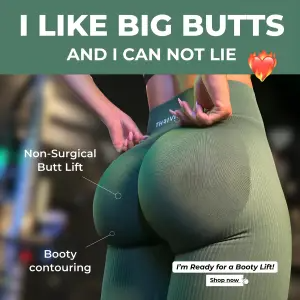
Using the attached image as the layout reference: keep the solid colour banner across the top with a bold caps headline and a smaller line beneath it, a close-up product-in-use photo filling the frame, thin white pointer lines running from labels to specific parts of the product, and a small white button graphic in the bottom right. Replace the photo with {YOUR PRODUCT IN USE} and the banner colour with {YOUR BRAND COLOR}. Set the headline to "{THE HOOK}", the pointer labels to "{FEATURE CALLOUTS}", and the button to "{CTA}".Reference 7
AI Edit Master Prompt
Using the attached image as the layout reference: keep the light background, the wordmark top left, a two-line headline with the second line in italics, a desktop calendar window filling most of the frame with hourly rows packed edge to edge in coloured blocks with emojis, the product overlapping the lower right corner, and a coloured banner across the bottom. Replace the product with {YOUR PRODUCT} and the accent colour with {YOUR BRAND COLOR}. Set the wordmark to "{YOUR BRAND}", the headline to "{THE IDENTITY}", the calendar entries to "{THEIR DAY}", and the bottom banner to "{THE PAYOFF}".