
Notes App Screenshot
- Format
- Static
- Category
- Native & UI Mimicry
- Stage
- TOF
- Requires
- Prompt only
What is it
An ad that mimics the iOS Notes app — yellow back arrow, plain white background, a bold headline, a checklist — so a product recommendation reads as someone's private note instead of a designed ad. Notes is where people keep grocery lists and brain dumps, and nobody makes marketing in it.
What makes it work
Get the native header exactly right
The yellow back arrow, the timestamp, the row of icons, the plain white background. This is the single fastest trust signal in the format and the eye clocks it before reading a word.
Better production makes it worse
Custom fonts, gradients, studio product shots — every visible design decision signals that a marketer touched it. This is the archetype where polish costs you the most, so if your instinct says "let me clean this up," that instinct is wrong.
Write the headline as a private revelation
"Why I'm ditching coffee for this" beats "Try our mushroom coffee." One is a diary entry, the other is a banner. The villain framing usually pulls hardest because it implies a story.
Write the checklist like a tired person jotting reasons
"no more 3pm crash" beats "supports sustained energy." Clipped, lowercase, uneven. Perfectly parallel marketer-grammar bullets snap the reader out of it instantly.
Keep the product inside the note
Pasted into the white space, the way someone would paste a photo. A polished product panel bolted on below reintroduces everything you just avoided.
One or two emojis, not six
The yellow checkmark is load-bearing — it makes the list scannable and native at once. Every extra emoji nudges the note toward designed.
Reference 1
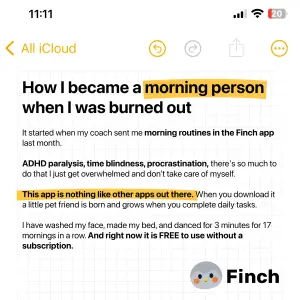
AI Edit Master Prompt
Using the attached image as the layout reference: keep the full-screen iOS Notes layout with a status bar, a yellow back arrow and folder name, a row of yellow toolbar icons, a large bold headline with one phrase highlighted in yellow marker, then several short paragraphs of plain body text with one full sentence highlighted, and a small logo and brand name in the bottom right. Replace the logo with {YOUR LOGO}. Set the headline to "{THE REVELATION}", the body to "{THE STORY}", and the brand to "{YOUR BRAND}".Reference 2
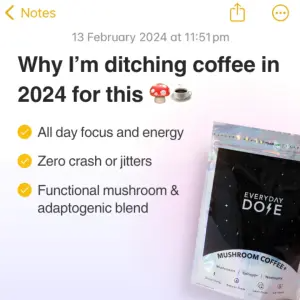
AI Edit Master Prompt
Using the attached image as the layout reference: keep the iOS Notes layout with a yellow back arrow reading "Notes", share and menu icons, a date and time line, a bold two-line headline with a couple of emojis, three yellow-checkmark list items, and a product photo pasted into the lower right of the note. Replace the product with {YOUR PRODUCT}. Set the headline to "{THE REVELATION}" and the list to "{THREE REASONS}".Reference 3

AI Edit Master Prompt
Using the attached image as the layout reference: keep the iOS Notes layout with a yellow back arrow and menu icon, a bold two-line headline with emojis, a product photo pasted directly beneath the headline, and four yellow-checkmark list items below it. Replace the photo with {YOUR PRODUCT}. Set the headline to "{THE LIST PROMISE}" and the list to "{FOUR REASONS}".Reference 4
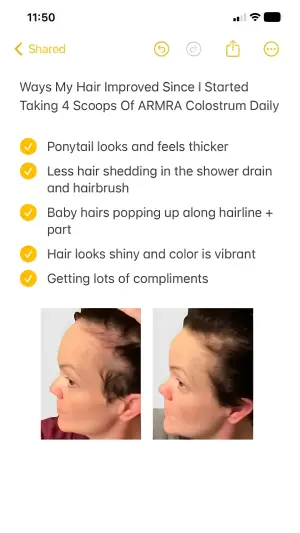
AI Edit Master Prompt
Using the attached image as the layout reference: keep the full-screen iOS Notes layout with a status bar, a yellow back arrow reading "Shared" and a row of toolbar icons, a plain unbolded two-line title, five yellow-checkmark list items with some wrapping to two lines, and two before-and-after photos pasted side by side at the bottom of the note. Replace the photos with {YOUR BEFORE PHOTO} and {YOUR AFTER PHOTO}. Set the title to "{WHAT CHANGED}" and the list to "{FIVE OBSERVATIONS}".Reference 5
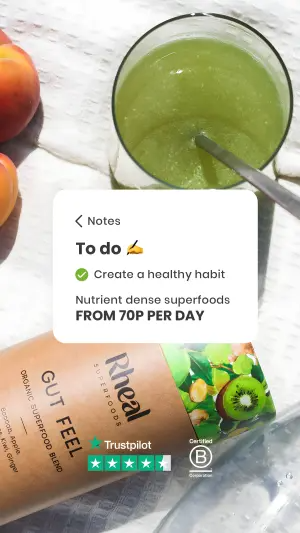
AI Edit Master Prompt
Using the attached image as the layout reference: keep the top-down lifestyle photo filling the frame with the product and props arranged around a glass, and a white rounded Notes snippet floating over the centre containing a small back arrow reading "Notes", a bold short heading with an emoji, one green-checkmark line, a line of plain text and a bold line beneath it. Keep the product in the lower third with a review badge beside it. Replace the scene with {YOUR PRODUCT IN USE}. Set the heading to "{THE LIST TITLE}", the checkmark line to "{THE GOAL}", and the lines below to "{WHAT IT IS}" / "{THE PRICE LINE}".